Pomodozer Plus v1.2.0 – new version of the Pomodoro timer released.
We’re happy to announce the official release of Pomodozer Plus v1.2.0 — an improved version of our powerful Pomodoro desktop app for Windows.
If you enjoyed the simplicity of Pomodozer Lite, you'll love the flexibility and growing feature set of the Plus version.
💡 What's New in Pomodozer Plus v1.2.0?
Pomodozer Plus v1.2.0 brings usability improvements and better control over your productivity tracking:
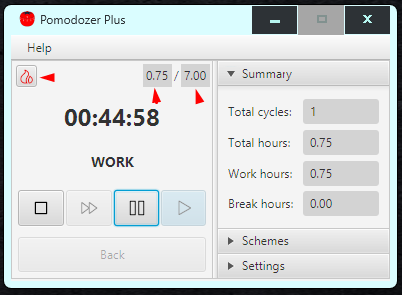
- 🧹 Added “Clear Summary” button — reset your accumulated statistics anytime
- ⏳ Added “Hours Planned” field — planned hours in your current session
- 📊 Added “Hours Worked” field — actual hours worked in your current session
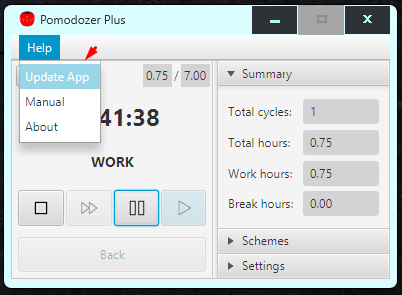
- 🔄 Added application update menu item in the Help menu
- 🛠 Improved stability and minor UI enhancements
🔑 Key Features:
- 💾 Save up to 3 custom pomodoro schemes — fully editable and persistent between sessions
- 🧩 Default classic scheme included — easy to customize for quick start
- 📈 Live productivity stats — track your sessions and focus time
- ⏱ Unlimited sessions — no daily limits
- 💻 Use on up to 3 personal devices
- 🪟 Supports Windows 10 and 11
- 🔐 Digitally signed with EV Code Signing Certificate
Pomodozer Plus v1.2.0 is digitally signed using a Code Sign Certificate with Extended Validation (EV), ensuring:
- Verified developer identity
- Trusted installation without SmartScreen warnings
- Protection against tampering
This makes it safe for both personal and workplace use.
💵 One-Time Purchase, No Ads
Pomodozer Plus v1.2.0 is available for a one-time purchase of $5, with:
- Free bugfix updates for all 1.x versions
- No subscriptions
- No ads
- No internet connection required
Download Pomodozer Plus v1.2.0 from our official website and take your productivity to the next level.
If you're serious about deep work, structure, and staying focused — Pomodozer Plus is built for you.